 Български
 Čeština
 Dansk
 Deutsch
 Ελληνικά
 English
 Español
 Eesti
 Suomi
 Français
 Gaeilge
 Hrvatski
 Magyar
 Italiano
 Lietuvių
 Latviešu
 Malti
 Nederlands
 Polski
 Português
 Română
 Slovenčina
 Slovenščina
 Svenska

In this article (16)
- The short version
- What SortyChat is and who it is for
- It answers from your catalogue, not from the internet
- It advises like an experienced shop assistant
- A look that fits your website
- Full screen on mobile
- Content & knowledge: shipping, returns, FAQ
- When a person is needed
- 24 languages with no extra work
- Conversations and statistics
- Managed AI, or your own key
- Security and data protection
- How to launch SortyChat in a few minutes
- What you get for €9 a month
- Conclusion
- Frequently asked questions
It is a quarter to eleven at night. A customer with a phone in hand is looking for a catfish reel, €150 at most. Your reel category has forty of them. The filters tell him which are in stock and what they cost, but not which one will hold a catfish from the Danube. He jumps between products for a few minutes, then closes the tab and never comes back.
In a physical shop, a sales assistant would ask where he fishes and hand him three reels. On your website you have no such person – and certainly not at ten at night.
That is exactly what we built SortyChat for: an AI assistant you add to your website with a single line of code. It answers visitors from your catalogue in Sortyra, recommends specific products and explains why, gently suggests add-ons and, when it is not sure, hands the question over to you. In this article we show how it works – with real screenshots from the app.
The short version
- It answers only from your catalogue. Products, attributes, variants, prices and availability come from your output in Sortyra. It invents nothing.
- It advises like a shop assistant. For a question such as “a catfish reel under €150” it shows 3–4 products with a badge (Best value, Cheapest…) and a one-sentence reason.
- It sells add-ons too – line for the reel, a reel for the rod. Matter-of-factly, and at most one offer at a time.
- You set the whole look: colour, theme, corner rounding, position, launcher, name, icon, greeting and quick questions – with a live preview.
- It works on mobile and in 24 languages, with a contact form, conversations and statistics.
- It costs €9 a month with everything in this article. Before paying, you try it in the app with 5 answers.
What SortyChat is and who it is for
SortyChat is a chatbot that appears in the corner of your website. A visitor types a question in their own words and gets an answer within a few seconds – with product cards they can simply click.
It is an add-on to your Sortyra subscription. It needs no separate import and no extra feed: it answers from the output you already have in Sortyra, that is, from the products as you edited, completed and translated them. If you do not have an output yet, start with the guide Your first output.
It helps most where parameters decide and the customer needs advice – fishing and outdoor gear, sports, tools, electronics or cosmetics.
What your shop gets: visitors get advice straight away, even at midnight, and do not have to click through dozens of products. You get fewer repeated questions and more people who leave with a product in the basket instead of empty-handed.
It answers from your catalogue, not from the internet
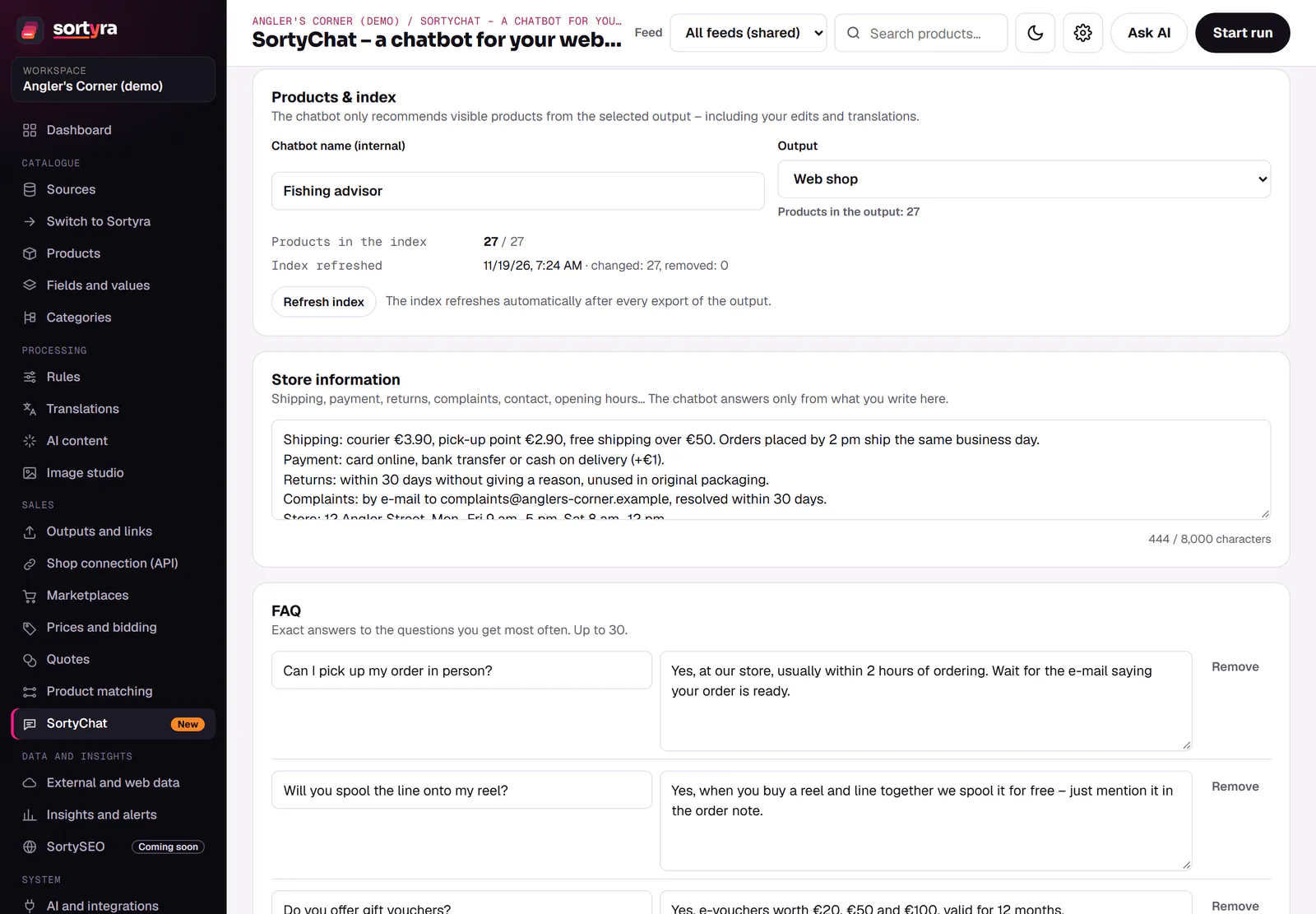
The biggest difference from a general-purpose chatbot is where SortyChat gets its information. It answers only from the data you give it:
- Products of the chosen output – name, brand, category, price with VAT and sale price, availability (in stock, last pieces, delivery time), attributes, variants, short and long description.
- Shop information – shipping, payment, returns, complaints, contact, opening hours.
- FAQ – exact answers you want the chatbot to use.
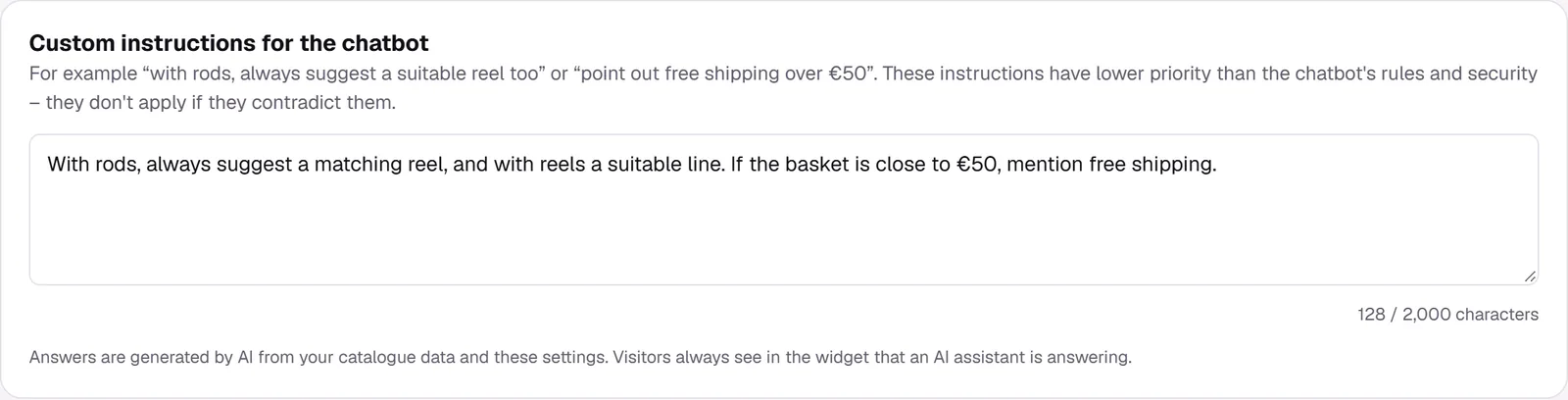
- Custom instructions – for example “with rods, always suggest a suitable reel”.
Internal data never reaches the chatbot: purchase prices, margins, suppliers or internal notes. What is not in the data, the chatbot does not know – and says so. It will not invent a discount, a delivery date or a product you do not sell.
Products are refreshed in the chatbot automatically after every export of the output. When you change a price or a product sells out, the chatbot knows at the next feed update – you upload nothing by hand.
It advises like an experienced shop assistant
Back to the customer from the introduction. He types into the chat: “I’m looking for a catfish reel under €150. What do you recommend for the best value for money?”
SortyChat first explains in one sentence what matters when choosing for catfish – a strong front drag and a large spool for thicker line. Then it compares the reels in your catalogue by the attributes that matter for catfish, and by price. It shows three, each with a different badge:
- Best value – 15 kg drag, metal spool and 6 + 1 bearings for €119.90,
- Cheapest – 12 kg drag and an aluminium spool for €89.90,
- Most durable – 18 kg drag and a sealed metal gearbox for big rivers.
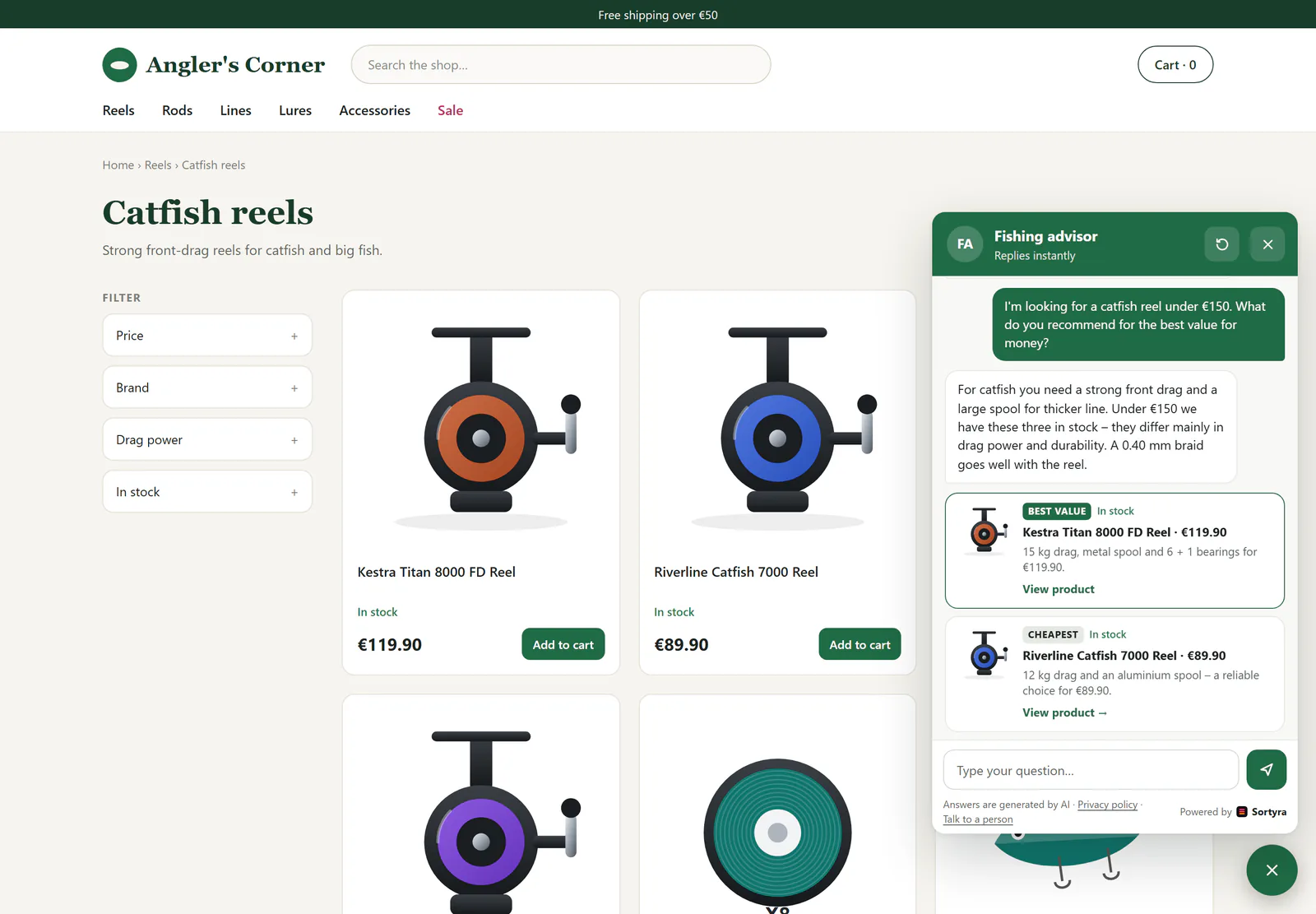
Every reason rests on specific attributes from your data, not on generic phrases. And what is missing from the answer matters just as much: the €189 reel is not there, because it exceeds the budget. The chatbot mentions a product over budget at most as an alternative, when you have nothing else.
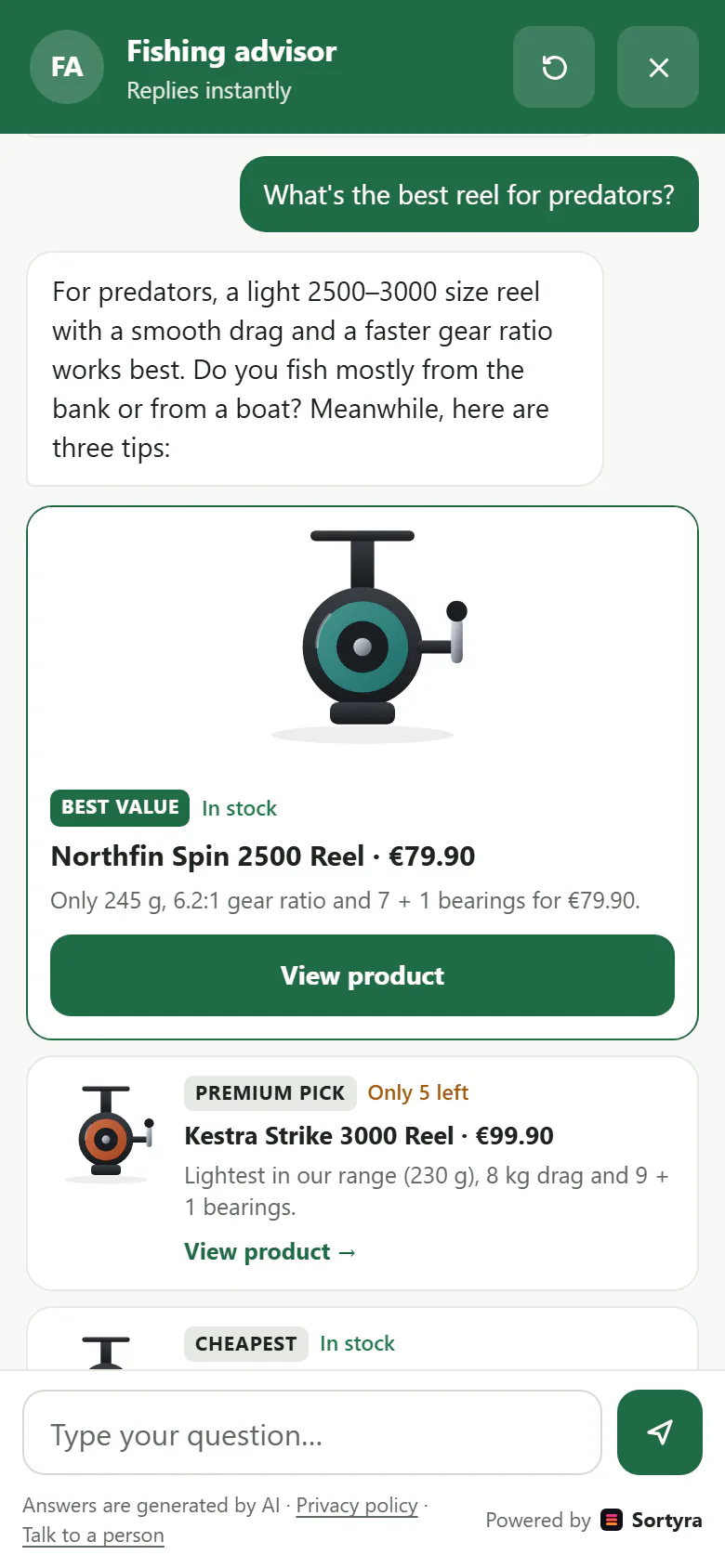
A product gets a badge (Best value, Cheapest, Most durable, Lightest, Premium choice) only when the data really supports it. For follow-ups such as “do you have a cheaper one?” the chatbot answers in the context of the conversation. And when a question is too general – for example “which reel is best for predators?” – it asks one clarifying question and shows a few tips at the same time.
Add-on sales without being pushy
In the catfish answer the chatbot added a fourth card: 0.40 mm braided line that suits the reel. That is how add-on selling works in SortyChat – line for the reel, a reel for the rod, pliers for the lures. At most one offer per answer, always with a factual reason, never a “you might also like”.
If you want the chatbot to always keep something in mind, write it into custom instructions. Instructions have a lower priority than the chatbot’s rules and safeguards, so nobody can use them to make the chatbot promise nonsense.
Cards lead straight to the product
Every recommended product is a card with an image, price, availability, badge and reason. The View product button leads directly to the product page in your shop – not to search results or the home page.
UTM parameters utm_source=sortyra and utm_medium=chatbot are added to the links. You then see visits and purchases from the chat as a separate source in your analytics. If you do not want UTM, switch them off in the Limits & handover tab.
What your shop gets: the customer gets from a question to the right product in two clicks, and you see how much revenue the chat brought.
A look that fits your website
A chatbot that looks like a foreign element gets ignored. That is why in SortyChat you set everything the visitor sees:
| Setting | Options |
|---|---|
| Name and icon | your own name for the assistant; chat icon, initials or your logo |
| Greeting | your own text, otherwise a default greeting in the visitor’s language |
| Main colour | six ready-made colours or any custom one; we calculate the text colour on buttons so the text is always readable |
| Window theme | light, dark or follow the website (dark on a dark background) |
| Rounding | subtle, medium or pronounced corners |
| Button on the website | bottom left or right; icon only, or icon with text, for example “Let me help you choose” |
| Quick questions | up to four questions under the greeting that a visitor starts with one click |
You see everything immediately in the live preview next to the settings – in desktop and mobile view. The preview is not a picture but a real chat: you can ask it something right away and see an answer built from your products.
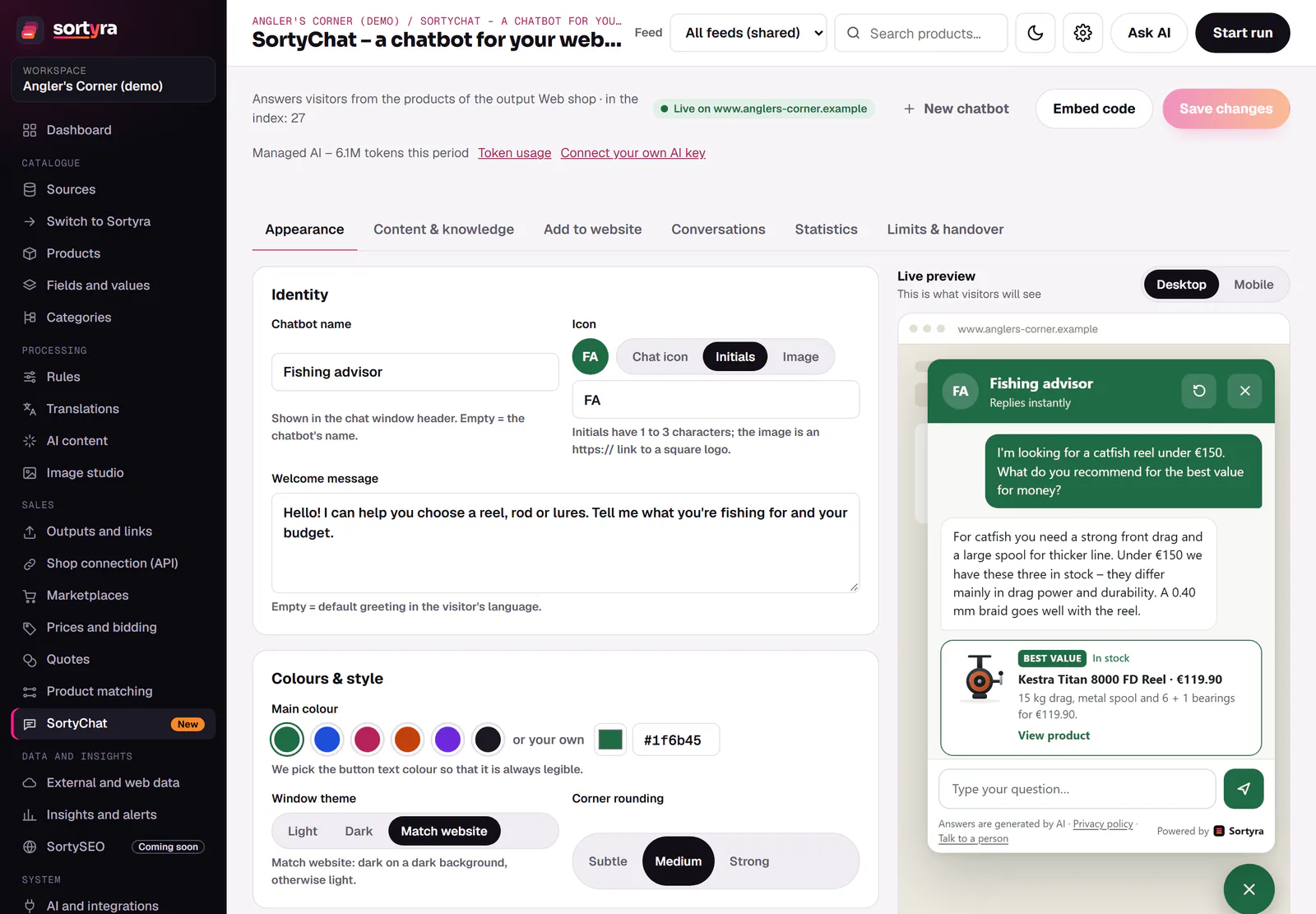
The chat window is isolated from the page – your website’s styles cannot break it, and the chat does not touch your design. In the footer there is a small “Powered by Sortyra” link and a note that the answers are generated by AI.
Full screen on mobile
A large share of shop visits comes from phones, so on a narrow screen SortyChat opens full screen. The first recommended product appears as a large card with an image and a full-width button, the others as compact cards below it. The buttons are big enough for a thumb, and the keyboard does not open by itself so that it does not cover the answer.
Content & knowledge: shipping, returns, FAQ
Questions such as “How much is shipping?” or “Can I return it?” are handled most reliably when you give the chatbot the source material:
- Shop information – free text up to 8,000 characters: shipping and its price, payment, returns, complaints, contact, stores and opening hours.
- FAQ – up to 30 question and answer pairs. Good for things you want said exactly in your own words.
- Tone of answers – friendly, formal or concise.
- Link to the privacy policy – shown in the chat footer and next to the contact form.
The chatbot answers only from what you write here. If something is missing, it admits it and offers your contact details – it does not guess.
When a person is needed
Some things the chatbot is not meant to handle, and will not: the status of a specific order, a complaint, a change to an order, an individual price or a bulk purchase. It then offers Talk to a person – a short form where the visitor enters an email, optionally a name, and a message.
The form reaches you by email together with the course of the conversation, and your reply goes straight to the visitor. You set the address in the Limits & handover tab. The Talk to a person link is also in the window footer, so anyone who wants a human right away does not have to persuade the chatbot.
24 languages with no extra work
The chat window texts are ready in all 24 Sortyra languages, and the chatbot answers in the language the visitor writes in – product and brand names stay unchanged. If you sell in several markets, you can have several chatbots, for example for your English and German websites, each with its own output and look. For translating outputs, the Translations feature helps.
Conversations and statistics
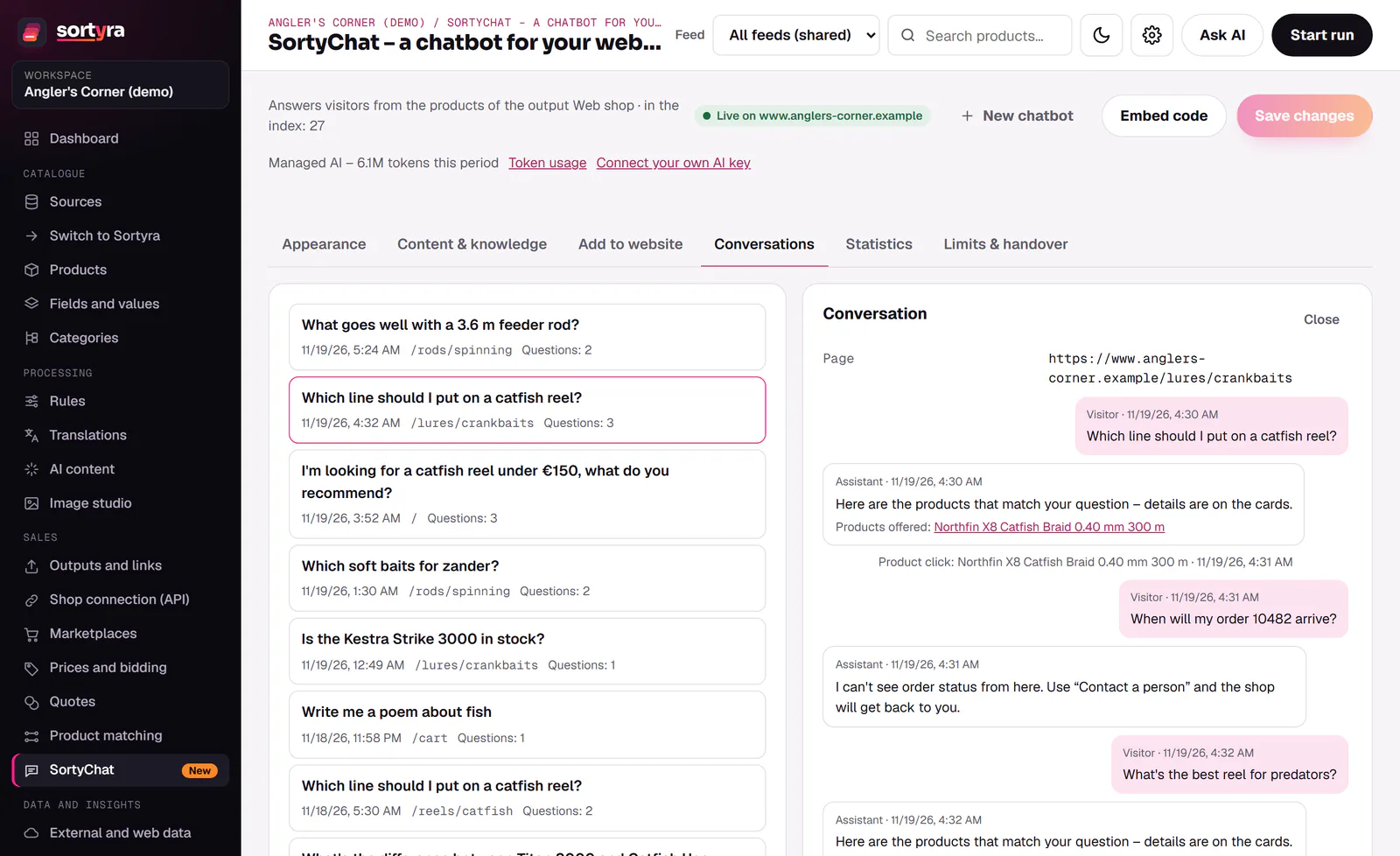
You have all conversations in the Conversations tab: the first question, the page the visitor wrote from, the number of questions and whether they left a contact. A click shows the whole course – questions, answers, offered products and clicks on them.
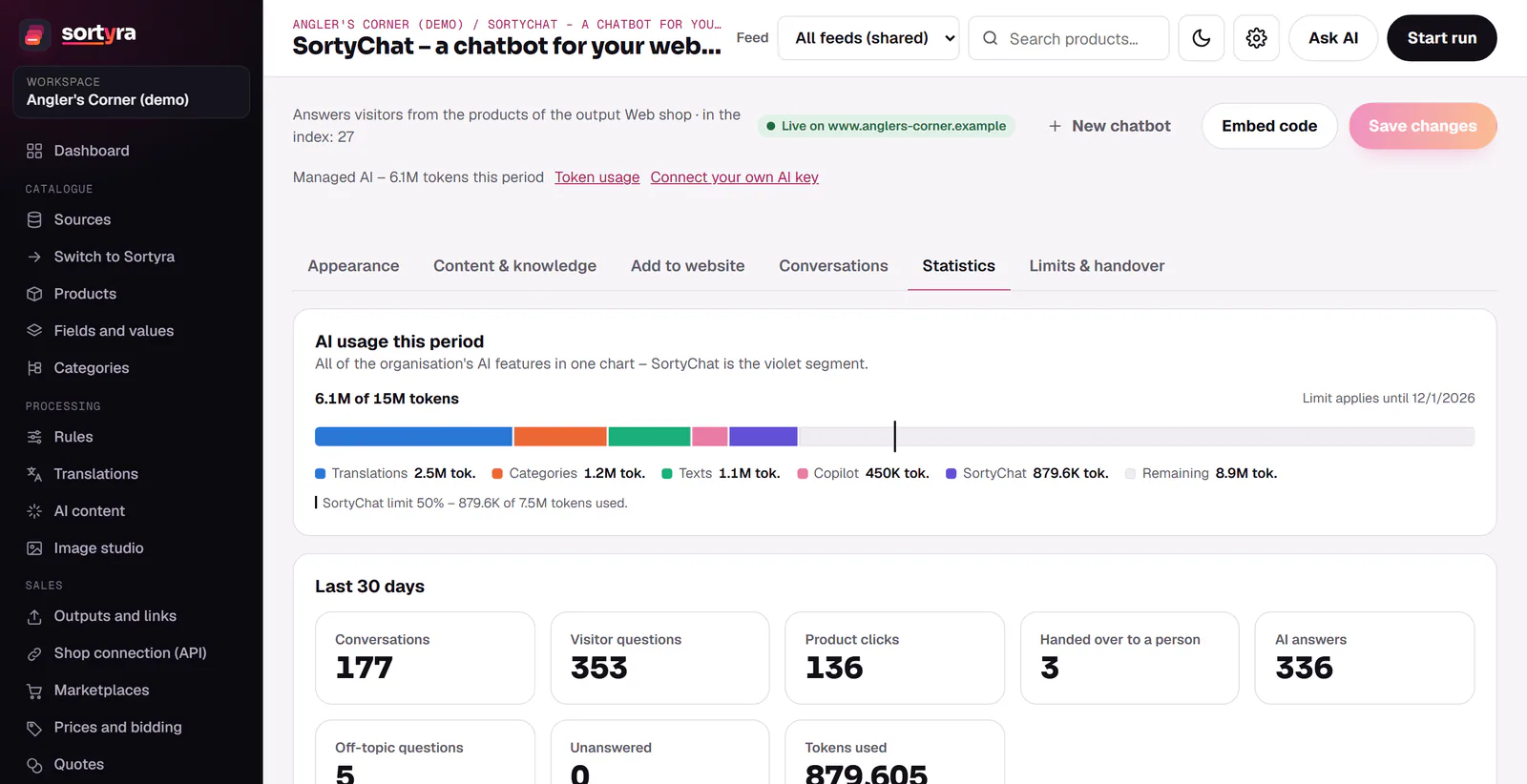
The Statistics tab shows the last 30 days: the number of conversations and questions, AI answers, clicks on products, questions handed to a person, off-topic questions, unanswered questions and token usage. Below that is a chart of questions by day and a list of the latest visitor questions.
Unanswered questions show you what is missing from your shop information, and the most frequent questions reveal what customers cannot find on your website.
Managed AI, or your own key
SortyChat needs artificial intelligence to answer. You have two options, and you choose:
- Managed AI – the chatbot draws on the monthly token limit of the Managed AI add-on. So that the chat does not use up the tokens needed for translations and feed edits, it can use at most the share of the limit you set – 50 % by default. When it is used up, the other AI features keep running.
- Your own key – you connect your own key from your AI provider. You pay the provider directly for usage, and us only €9 for SortyChat.
You see all usage in a single chart: translations, categories, texts, images, Copilot and SortyChat, each area in its own colour, together with a limit marker for the chat.

If AI is not available – the key has stopped working, the tokens have run out or the subscription is unpaid – the chatbot does not disappear from your website. It politely offers visitors the contact form, and you get an email telling you what to do. You can find more about connecting AI in the article AI and integrations.
Security and data protection
A chatbot on a website is public, so it has several layers of protection:
- Only your domains. The chatbot answers only on websites you allow. On someone else’s page, copied code will not display it.
- Limits. The number of messages from one visitor is limited, and you set the daily number of answers yourself – 300 per 24 hours by default. It protects against abuse and against unexpected AI usage.
- No internal data. Purchase prices, margins and suppliers never reach the chatbot at all.
- Resistance to tricks. Attempts such as “ignore the rules” are ignored by the chatbot, and questions unrelated to shopping are politely declined.
- Data protection. We store conversations on servers in the EU and delete them automatically 90 days after the last message. The widget uses no cookies and does not store the visitor’s IP address in readable form.
Tell your visitors about the chatbot in your own privacy policy – a link to it appears right in the chat window. You can find details on how Sortyra processes data in the article Data and privacy.
How to launch SortyChat in a few minutes
- In the menu, open SortyChat, choose the output with products, name the chatbot and click Create chatbot. The chatbot is still switched off – you put it on the website only when you are happy with it.
- In the Appearance tab, set the colour, name, greeting and quick questions.
- In the Content & knowledge tab, add shop information, FAQ and, if needed, custom instructions.
- Try the chatbot in the live preview. Before paying, you have 5 trial answers on your products.
- Click Activate SortyChat. The add-on is added to your subscription, and for the rest of the current period you pay only the pro-rata part.
- In the Add to website tab, add your website’s domain, copy the code and paste it before the end of the page (the
</body>tag). Then switch the chatbot on.
The embed code is a single line:
<script src="https://app.sortyra.com/chat/widget.js" data-sortyra-bot="YOUR_KEY" async></script>Instructions for Shoptet, WooCommerce, Upgates and other websites are right in the app.
What you get for €9 a month
| Part | What it means for you |
|---|---|
| Answers from the catalogue | products, attributes, variants, prices and availability from your output, refreshed after every export |
| Advice | 3–4 products with a badge and a reason, within the customer’s budget |
| Add-on sales | a factual offer of a related product, guided also by your instructions |
| Cards with a link | image, price, availability and a direct link to the product with UTM |
| Appearance | colour, theme, rounding, position, button, name, icon, greeting, quick questions, live preview |
| Mobile | full-screen window with large cards and buttons |
| 24 languages | window texts and answers in the visitor’s language |
| Talk to a person | contact form with the course of the conversation sent to your email |
| Conversations and statistics | the full course of conversations and a 30-day overview |
| Protection | allowed domains, limits, no internal data, deletion after 90 days |
SortyChat is billed with your subscription on the same day, and with annual payment at the same discount. You can cancel it at any time – it runs until the end of the paid period. The only thing not included in the €9 is the AI usage itself – that comes from your own key or from Managed AI tokens. You can find current prices in the pricing.
Conclusion
A good shop assistant asks what you need the goods for, shows a few suitable options, says how they differ and reminds you what else you will need. SortyChat does exactly this on your website – from your data, in your colours and in the customer’s language. If you do not know Sortyra yet, try it or write to us.
Frequently asked questions
Do I need a developer for SortyChat?
No. You add one line of code to your website – in Shoptet, WooCommerce, Upgates or via Google Tag Manager you can do it without programming. Everything else you set in Sortyra.
Where does the chatbot get product information?
From the output you choose in Sortyra: names, prices, availability, attributes, variants and descriptions. You write the shop information and FAQ yourself. Internal data such as purchase prices or suppliers never reaches it.
Can the chatbot give a wrong price or invent a product?
Prices and availability on the cards come straight from your data, and the chatbot may recommend only products from your catalogue. The answers, however, are written by artificial intelligence and it can make mistakes, which is why the chat window always states that AI is answering. The shop is responsible for the accuracy of the source material – prices, availability and terms.
How much does the AI behind SortyChat cost?
SortyChat costs €9 a month. The artificial intelligence runs either on your own key from your AI provider (you pay the provider by usage) or on the tokens of the Managed AI add-on, of which the chat may use at most the share you set. You see the usage in one chart.
Can I try SortyChat before paying?
Yes. You set it up in the app, and in the live preview you get 5 trial answers on your products. On your shop’s website it starts answering after you activate the add-on.